
How to Reset Fake AirPods (Replicas): Soft Reset vs Hard Reset
Resetting is the first thing most people try when their replicas start misbehaving, and it's often the right call — but "reset" actually covers two different procedures, and they fix different things. Get them mixed up and you can burn an afternoon without changing anything.
Here's the short version: a soft reset clears pairing quirks without touching your buds' stored settings. A hard reset is a deeper clean for when the soft reset won't stick. Before you start, know that reset behavior can differ by chipset, manufacturer, and firmware version, so treat these steps as the community-standard procedure rather than a universal button combo. If a step doesn't match what you see, confirm the current method in the common issues guide or ask in the Discord instead of guessing.
Quick Answer: To soft reset fake AirPods, forget them in your phone's Bluetooth menu, turn Bluetooth off, place the pods in the charging case with the lid open, hold the back button for 5–10 seconds until the LED flashes, and close the lid for 60 seconds. For severe sync issues or iCloud bugs, hold the back button for 15 seconds until the LED cycles amber then white for a full factory controller reset.
Soft reset (start here)
A soft reset fixes the everyday stuff: one bud not connecting, a pairing that keeps dropping, or AirPods that refuse to show up when you open the lid. You're clearing the Bluetooth pairing state, not wiping the buds.
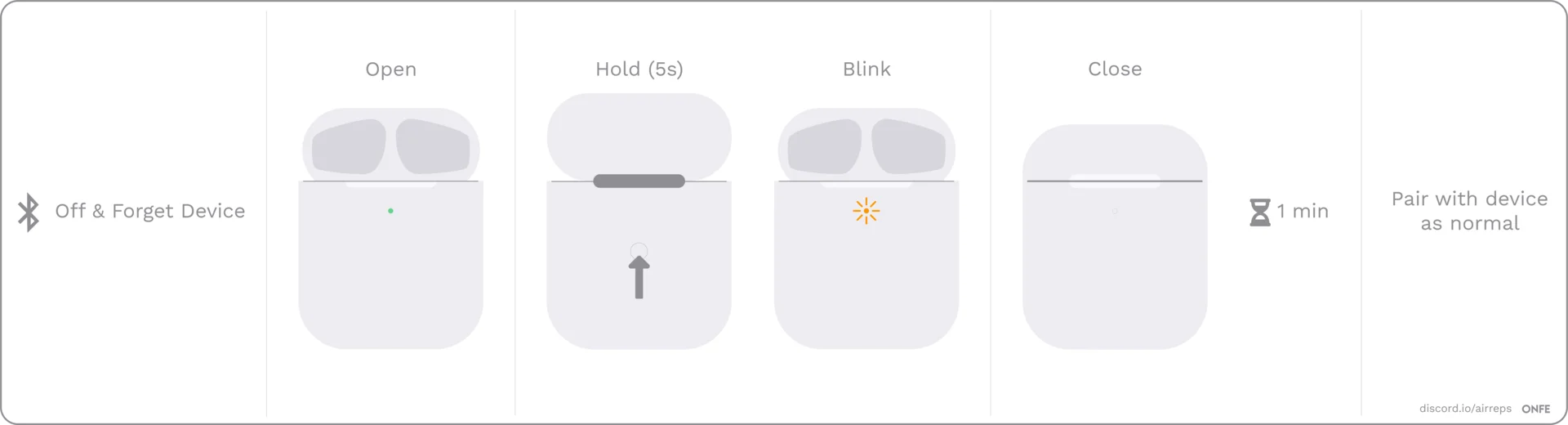
- Forget the device from your Bluetooth settings, then turn Bluetooth off.
- Open the lid and hold the back button for a few seconds, until the light flashes, then close the lid. Don't worry if your light doesn't flash exactly like the image.
- Wait a full minute. Then turn Bluetooth back on, open the lid, and try to reconnect.
- If it still won't connect, take the pods out and put them back in. Close the lid and wait for the light to turn off, then open it and try again.
One heads-up that trips people up: it can take 3–4 soft resets before it works. That's normal — don't give up after the first attempt. If several soft resets in a row do nothing, move on to a hard reset.
Hard reset
When the soft reset won't take, the guide's hard reset works by draining any residual charge so the buds forget their state completely.
- Forget the AirPods from your Bluetooth settings.
- Remove the pods from the case and leave them out for several hours to fully drain the battery. Leave the case open too — you want no residual charge left, so give it at least a full day, longer if needed.
- Once drained, put the pods back in the case and charge the case.
- Now do a soft reset — again, expect it to take 3–4 attempts.
The deeper case-button reset
There's also a stronger case-button reset documented in our iCloud compatibility fix. With the pods in the case and the lid open, hold the pairing button on the back for about 15 seconds, until the light flashes amber and then white, then close the case. That's the closest thing to a factory reset these clones have.
A lighter version of the same button shows up for a specific symptom: if only one pod works and it slowly flashes every time you open the case, holding the back button for 2–3 seconds while the pods are in the case resets the pairing.
Because the exact timing here varies between chipsets and batches, confirm the current procedure before relying on it. If your model behaves differently, the connectivity notes and the community are your best reference.
A reset never replaces re-pairing
This is the most common misunderstanding: a reset doesn't reconnect anything. It only clears the saved pairing state, which means you still have to pair your AirPods again afterward — through the iOS popup on an iPhone or through the normal Bluetooth menu elsewhere. If pairing itself is the problem after a reset, work through the won't-connect troubleshooting rather than resetting again.
When a reset is the wrong fix
A reset only helps with pairing and connection glitches. It won't help in these cases:
- A Jieli-tier clone that no app detects. If none of the community firmware apps will connect to your buds, resetting changes nothing — that's a low-end chipset limitation, not a glitch.
- A bug with a known specific fix. macOS iCloud pairing issues and the stuck volume slider have their own procedures. Resetting before trying those just wastes time; the common issues guide links to both.
- A hardware fault. If a pod is genuinely dead, no number of resets will revive it. At that point it's a conversation with your seller.
Settings you may need to redo
After a reset, some of your preferences can go back to defaults. Name changes, tap controls, and similar settings are made through iOS — borrow an iPhone once, set them there, and they usually save to the buds and stick. The iOS pairing popup may also behave like a first-time setup again, so don't be surprised if it reappears or shows the generic name.
Related troubleshooting and setup guides:
- Earbuds still failing to advertise? Walk through Fake AirPods Won't Connect.
- Using an Android device? Learn how settings carry over in AirPods Replicas on Android.
- Paired to a modern iPhone? Check compatibility nuances in Do Fake AirPods Work With New iPhones?.
- Wondering if an uncooperative pair is genuine or cloned? Use our How to Spot Fake AirPods Guide.
FAQ
What's the difference between a soft reset and a hard reset on fake AirPods?
A soft reset forgets and re-pairs the buds to clear connection glitches. A hard reset drains the pods completely before redoing the soft reset, which clears deeper state when the soft reset won't hold. The case-button long-press is a stronger, factory-style reset on models that support it.
How many times should I try a soft reset?
Plan for 3–4 attempts. That's the documented normal for replicas — a single try that doesn't stick doesn't mean the procedure failed.
Does resetting fake AirPods change my settings?
It can. After a reset, your custom name and tap controls may be gone, since those are set through iOS. Re-apply them from an iPhone and they should save to the buds.
Will a reset fix my clone if the firmware apps don't detect it?
No. If no community app connects, you likely have a low-end Jieli chipset, and a reset won't change that. Use the useful apps page to check which apps match which chipsets.