
Common Issues
Newer models fix these bugs
Most newer models sold through the trusted sellers have addressed these issues long ago. If you're experiencing problems, ensure you have the latest version from a verified seller.
Soft Reset for AirPods Replicas
Follow these steps to perform a soft reset on your AirPods replicas: 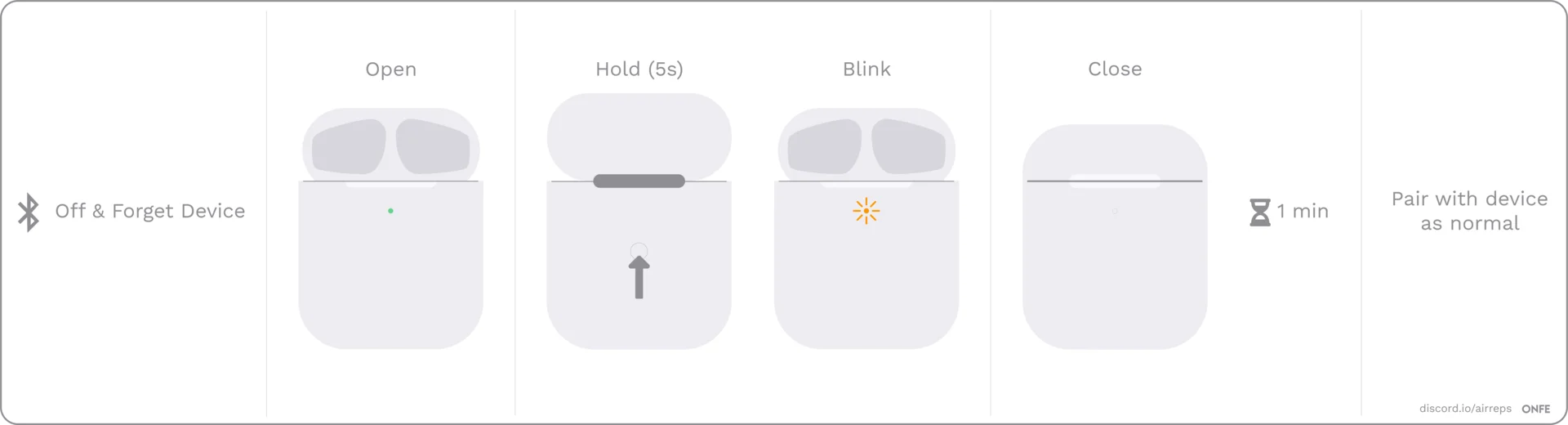
- Forget your device from Bluetooth settings, then turn off Bluetooth.
- Open the lid and hold the back button for a few seconds, until the light flashes, then close the lid. Don't worry if your light doesn't flash the same as in the image.
- Wait a full 1 minute, then turn on Bluetooth, open the lid and try to reconnect.
- If it doesn't work, take the pods out and put them back in. Close the lid and wait for the light to turn off. Then open it and try again. It can take 3-4 SOFT RESETS to work. If it doesn't work, try a HARD RESET (see below image)
Hard Reset
Follow these steps to perform a hard reset on your AirPods replicas:
- Forget your AirPods device from Bluetooth settings.
- Remove the pods from the case for several hours to let the battery fully drain. Leave the case open. It's important to not have any residual charge left, so leave it out for at least one full day or more if required.
- Once it's drained, put the pods back in the case and charge the case.
- Now, do a SOFT RESET. It can take 3-4 SOFT RESETS to work.
Opening AirPods Replicas
You may receive mis-marketed AirPods clones when ordering on sites like AliExpress from unverified sellers. You can use the app for the chipset to verify that you received the correct chipset. However, simply showing the app is often not enough proof. You may need to open the AirPods and take a picture of the chipset as proof. Here's how you can do this, without damaging the AirPods:
Audio/Video Pausing Frequently with AirPods Replicas
Frequent pausing of audio or video while using AirPods replicas is a common issue, often caused by the in-ear detection sensors (on Pro models). This issue can also occur if the AirPods do not fit securely in your ear. To fix this issue, you can either choose other ear tips (on Pro models) or turn off in-ear detection through settings.
AirPods Replicas Remain Connected After Closing the Charging Case
Some users of AirPods replicas may experience an issue where the AirPods remain connected to their device even after closing the charging case. This is typically caused by a malfunction with the magnets and hall sensor inside the case, which are responsible for detecting the position of the AirPods. To fix this issue, follow the steps outlined in the following YouTube tutorial:
Bad Sound Quality or Bass Issues with AirPods Replicas on iOS
Some users of AirPods replicas may experience issues with the sound quality or bass on iOS devices. This is typically caused by the "Headphone Accommodations" feature, which is enabled by default on iOS. To fix this issue, go to Settings > Accessibility > Audio / Visual > Headphone Accommodations and turn it off.
Resetting Pairing on AirPods Replicas
If you are experiencing issues with only one of your AirPods replicas working properly, and the pod is slowly flashing every time you open the charging case, you can try resetting the pairing. This is a simple process that can help resolve the issue. To reset the pairing on your AirPods replicas, hold the back pairing button for 2-3 seconds while the pods are in the case.
L/R Imbalance Fix (The Easy Way)
To adjust the left/right volume balance on an iOS device, go to Settings > Accessibility. On an Android device, follow these steps:
- Open the Settings app and select Accessibility from the list.
- On the Accessibility screen, scroll down to the Audio and On-Screen Text section.
- Use the slider to adjust the volume balance until the audio sounds calibrated.
Can't Connect to macOS
To troubleshoot connectivity issues with AirPods, try the following steps:
- Forget the AirPods from your iPhone (This seems to be an issue with iCloud Connect).
- Try connecting the AirPods to your Mac.
- If you don't hear any sound when the AirPods are connected, you may need to reset them.
None of these fixed it?
It is possible that your AirPods arrived faulty or are now damaged beyond repair. You can try performing soft and hard resets, such as leaving the device uncharged for a period of time or playing music rather than forgetting it, in an attempt to fix the issue. If none of these methods work, your best option is to contact the seller and request a refund or replacement. Also check our iCloud compatibility fix and macOS volume fix if those apply to your situation.